







Ecommerce Steps to Selling Online

You can collect payments online for your products or services by adding to an existing website or creating a new one!

1 - Select an Ecommerce Plan


Choose a plan that fits your business needs and your budget. Your decision should be based on your desired website design, number of products, search, filter, sort, and payment processors.

See Comparison Chart

2 – Setup Your Payment Processor

The 3 main online payment processors are Square, PayPal, and Stripe. None of them have monthly fees but they all have transaction fees with every order.

See Online Payment Options

3 – Take Photos of Your Products 


You can take photos using your phone. Photos do not have to be professional because they will look more personal and authentic if they are your own. If you offer services instead of products, you can use stock photos.

4 – Upload Your Photos to the Internet


If you took photos using your phone, they may already be stored in Google Photos. If not, upload your files to any cloud-based storage like Dropbox, iCloud, etc. Rename the photos with relevant filenames to identify them like blue hat, red shoes, etc.

See Image Download Information

5 – Describe Your Products


There are several factors that go into a customer’s purchasing decision. It takes more than a Buy Now button. Create an Excel spreadsheet or Word document to identify each product by filename, product name, price, description, and options – color, size, etc.

Read More Information

6 – Determine Sales Tax & Shipping Options


  • Are your products or services taxable? Read More Information.
  • Are you going to offer shipping or is everything delivered or picked up?
  • Shipping Fee: free, flat rate, by product, by weight, order price, number of items
  • Shipping Method: Post Office, FedEx, UPS, other
  • Shipping Region: Local, US & Canada, Worldwide, Other

7 – Write Your Legal Policies


People want to know they are buying from a legitimate online store. Determine your terms & conditions, privacy policy, cancellations, returns, exchanges, and refunds. Also include shipping, taxes, payment information, and order notification email.

8 – Get Training


Even if you pay a Web Designer to create your online store, you are still responsible for all the steps above. Since you will need to process your orders and update your products, it is best to learn how to maintain your online store.

Book Training

Toolbox with tools on a laptop keyboard, symbolizing tech maintenance and repair.
By Arba Cooper November 19, 2025
As a Digital Technologist, I use a variety of tools to create custom marketing solutions. Click the image to go to the link.
Laptop surrounded by various interface elements, icons, and graphs; representing website or software design.
May 23, 2024
If you need to archive a website for later reference, you have a few options for saving it using Chrome. Each method has its features, depending on what you need from the webpage you're saving. Whether you're a minimalist, a convenience seeker, or a collector, Chrome offers a way to keep the web's riches in your digital pocket. HTML Only : This option saves the webpage in its bare-bones form, capturing only the HTML file. Think of it as saving the skeleton of the webpage without the flesh. You get the structure, the text, and the links, but it's like attending a gala in your finest attire and forgetting your shoes, purse, and accessories at home. The images, CSS (which dictates the webpage's style and layout), and JavaScript (which adds interactivity) are not saved. When you open the file, it might look like the webpage's less glamorous twin, missing its flair and dynamism.
HTML document with globe graphic, orange and blue.
January 16, 2024
Quickly generate the HTML code necessary for a table using the HTML Table Generator. This online tool will let you choose from a variety of sizes and let you customize the structure and visual look of the table with a standard selection of color and display options. This tool was designed for speed and efficiency so I've tried to include the essential options in order to let you put a table online as quickly as possible. This tool automatically generates the HTML, and CSS code. I revised the tool so that Javascript is no longer required - the highlight effect is now handled by the CSS hover pseudo-class.  You can also create a table without styles to your exact row and column size if you want to add your own custom CSS styling later on.
Mockups of several website landing pages, featuring various designs and content layouts.
December 21, 2023
A well-designed and converting landing page for your products and services is crucial for business growth. A thoughtfully crafted landing page can make all the difference in engaging and converting potential customers. Check out the template design ideas to help you create a landing page that drives results. With the right design, you can effectively showcase your offerings and compel visitors to take action, ultimately boosting your business success.
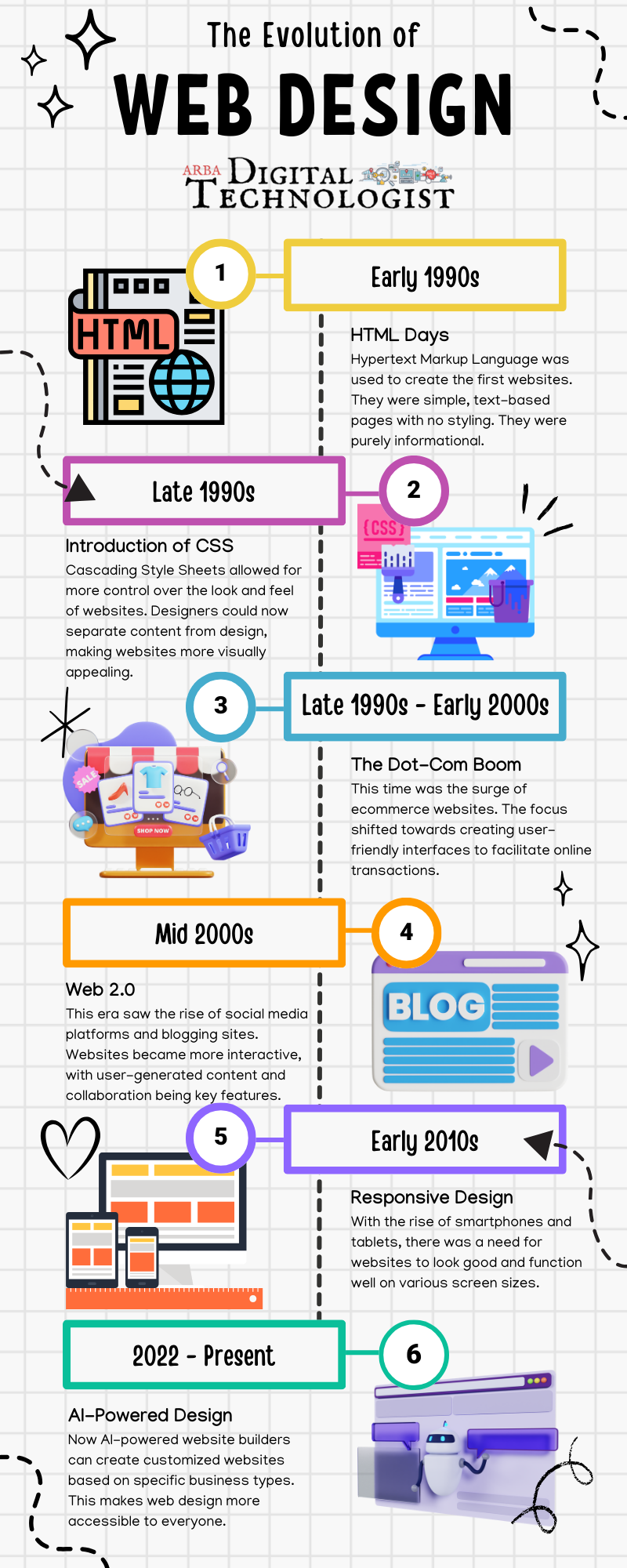
Infographic showing the evolution of web design, from the early 1990s to the present, with key milestones.
By info November 6, 2023
Laptop screen with code, being examined with a magnifying glass; blue background.
July 3, 2023
How to use Inspect Element in Chrome, Safari, and Firefox
June 14, 2023